
The last thing you want as a business owner is not to pay your workers what they are owed and be slowed down by tasking administrative duties. One of the best ways to solve both of these problems is through the use of punch clock systems to optimize your time and your workers. These systems can make a huge difference for your business and provide multiple benefits. Here’s how.
Editor’s Note: Some of the companies mentioned below have financial relationships with 350Connect.
What is a Clock in System (Punch Clock System)?
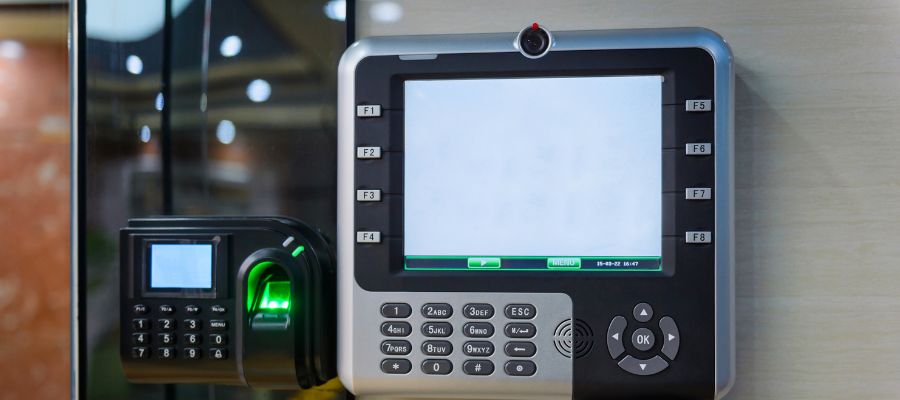
A punch clock machine, commonly called a time clock, is a mechanical or electronic device that records start and end hours for employees. These devices can be physical punch in and out machine for instance, swiping a paper time card through the machine and having the date and time printed on the sheet.
Modern punch clock systems have evolved. From the classic mechanical time clock models, we now have digital and biometric systems. These contemporary devices not only track attendance but also interact with payroll software, increasing efficiency and accurate reporting. They are ideal incentives for employees to show up on time and check in for their day.
Benefits of Punch Clock Systems
Enhanced Employee Accountability
Employees who rely on a reliable punch clock machine are more likely to stick to their hours.
Streamlining Payroll Processing
Integrating punch clock systems and payroll software helps to streamline the job of the accounting department. It eliminates the need for manual time calculations.
Compliance with Labor Laws
Employee time clock systems make it easy to follow labor laws and automate the steps required for legal documentation.
Reduced Time Theft
Punch clock systems create a paper or digital trail to document exactly when employees are working, helping to prevent time theft.
Types of Punch Clock Systems
Mechanical Punch Clocks: These are the classic models, which employ paper cards. They are simple but can be susceptible to faults and manipulation.
Digital Time Clocks: These clocks employ digital technology to keep time. They are more accurate than mechanical clocks and frequently can be integrated easily with software.
Biometric Systems: The most advanced form, these use unique biological traits like fingerprints or retinal scans to record attendance. This method reduces fraud and eliminates the need for physical time cards.
Web-Based Systems: These systems allow employees to clock in and out via a computer or a mobile device. These systems can be great for remote workers and those looking for cheaper options.
Quick Comparison of the Best Employee Time Clock Systems:
| System Name | Type | Primary Feature | Estimated Price |
| Lathem 1600E | Mechanical / Digital | Tru-Align Accuracy | $355 |
| Acroprint BioTouch | Biometric | Fingerprint / RFID | $119 |
| uPunch Starter Bundle | Mechanical | All-in-One Paper Kit | $129 |
| OnTheClock | Web-Based | Mobile App & GPS | $3.20/user |
| BambooHR | Software (HRIS) | Full HR Integration | Custom Pricing |
Best Ways to Track Employee Time and Attendance
Learn MoreCommon Features of Punch Clock Systems for a Business
Punch clock systems have evolved with technological improvements and now offer a variety of functions to meet a wide range of company demands. These features not only improve the basic function of time monitoring, but also add levels of efficiency, security, and integration. Some of the common features you can expect:
- Precision in time tracking with accurate punching
- Flexible “punch-in” methods like key cards, punch cards, biometrics, phone applications, etc.
- Automated payroll with time calculations
- Break and overtime tracking
- Ease of use compared to manually inputting the time
- Web accessibility
- Customizable reports
- Multi-location support and usage
- Scalable and self-service portable
- Biometric security features for employee verification
Top 5 Punch Clock Systems for a Business
Lathem Atomic Time Clock with Tru-Align 1600E
The Lathem 1600E is a popular punch clock machine distinguished by its Tru-Align technology and LED light. This device ensures perfect, easy-to-read time punches, lowering the lot of errors typically found in older mechanical systems.
- Ideal for: Small businesses needing a reliable desktop or wall-mounted machine.
- Highlight: Internal clock valid through 2099; works during power outages.
Price: $355
Acroprint BioTouch Time Clock
The Acroprint BioTouch is a highly efficient biometric time and attendance system. It is a self-contained punch in machine that requires no software installation.
- Three-Way Punching: Fingerprint scanner, RFID card/Key fob, or Pin number.
- Data Portability: Easy to track data via USB flash drive.
Price: $119
uPunch Starter Time Clock Bundle
If you need a mechanical punch clock that is designed to be a “plug-and-play” solution, this is the perfect product.
- What’s Inside: The machine, 100 time cards, two keys, and an ink ribbon.
- Ease of Use: Easy to track start times, breaks, and finishes.
Price: $129
4. OnTheClock (Best Web-Based System)
OnTheClock is a web based system used by over 125,000 employees. It is a digital time clock that works via mobile phone, tablet, or computer.
- Security: Features Geo-tagging to ensure employees are at the job site.
- Integration: Works with Gusto, ADP, and QuickBooks.
Price: $3.20 – $3.50 per employee/month.
5. BambooHR (All-in-One Software)
For companies that need a full software suite, BambooHR is the ideal system.
- Functionality: Employees punch in via the user application, track PTO, and add time to specific projects.
- Efficiency: HR managers can approve shifts with a single button.
Price: Custom pricing (Free trial available).
Buying Guide: How to Choose a Time Clock Machine
Choosing the right clock system involves more than just picking a machine. You must consider your working environment and the need of your employees.
- Determine Your Method: Do you prefer hand-fed time cards or a biometric face scan? Biometric systems are more secure, while a mechanical time clock is often more affordable.
- Check Integration: Ensure the software can add data directly to your payroll to save steps in administration.
- Assess Scalability: As your business grows, will you need more devices? Web-based systems are generally the easiest to scale.
Frequently Asked Questions About Clock in Systems:
What is the difference between a punch clock and a time clock?
A punch clock specifically refers to a machine that stamps a physical time card, whereas a time clock is a general term for any device (digital or mechanical) used to track attendance.
Can a biometric system record my facial recognition?
Yes, many modern biometric systems use facial recognition or fingerprint technology to verify the user, preventing employees from punching in for one another.
How do I set up a new punch in machine?
Most popular devices come with a simple start guide. Steps usually include mounting the device, connecting to Wi-Fi (for digital models), and issuing a time card or PIN to each employee.
Can I track employees who work at different job sites?
Yes. Modern web-based systems and mobile apps feature GPS tracking and geofencing. This ensures that employees can only punch in when they are physically present at the authorized job site, providing accurate reporting for multi-location companies.
What happens if an employee forgets to punch in?
Most cloud-based systems allow managers to manually add or edit a shift through an administrative user portal. These systems keep a log of all manual changes, ensuring transparency and preventing potential payroll disputes.
Is biometric data storage secure for my employees?
High-quality biometric time and attendance system do not store actual images of fingerprints or faces. Instead, they store an encrypted mathematical “hash.” This protects employee privacy while still providing the highest level of security and fraud prevention.
Looking for a Punch Clock System that Works for You?
Are you looking for a provider that truly understands your needs? Need someone to help you find the best solution for your company? 360Connect can help! Just fill out our form and we’ll connect you with up to 5 suppliers that can help you find that perfect system for you!
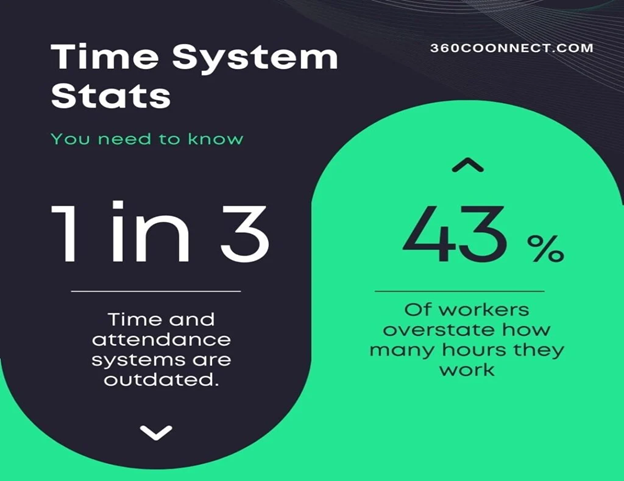
Sources for infographic:
“The Ultimate List of Time and Attendance Statistics: QuickBooks Time.” The Ultimate List of Time and Attendance Statistics | QuickBooks Time, QuickBooks, quickbooks.intuit.com/time-tracking/resources/time-attendance-stats/. Accessed 1 Feb. 2024.
Howarth, Josh. “49 Shocking Employee Theft Statistics (2024).” Exploding Topics, Exploding Topics, 5 Dec. 2023, explodingtopics.com/blog/employee-theft-stats.